Kedge
The ultimate home lab tool for managing distributed Kubernetes clusters.
Why Kedge?
Managing multiple Kubernetes clusters across your home lab, remote locations, or edge sites is painful. You end up juggling kubeconfigs, SSH tunnels, VPNs, and port forwards. Kedge solves this by providing a single control plane that connects all your clusters through secure reverse tunnels.
Perfect for:
- Home labs — Manage k3s/k0s clusters on Raspberry Pis, NUCs, or old laptops from anywhere
- Remote sites — Connect clusters behind NAT, firewalls, or without public IPs
- Edge deployments — Deploy workloads to distributed locations with simple placement rules
- Small teams — Multi-tenant workspaces with OIDC authentication
How It Works
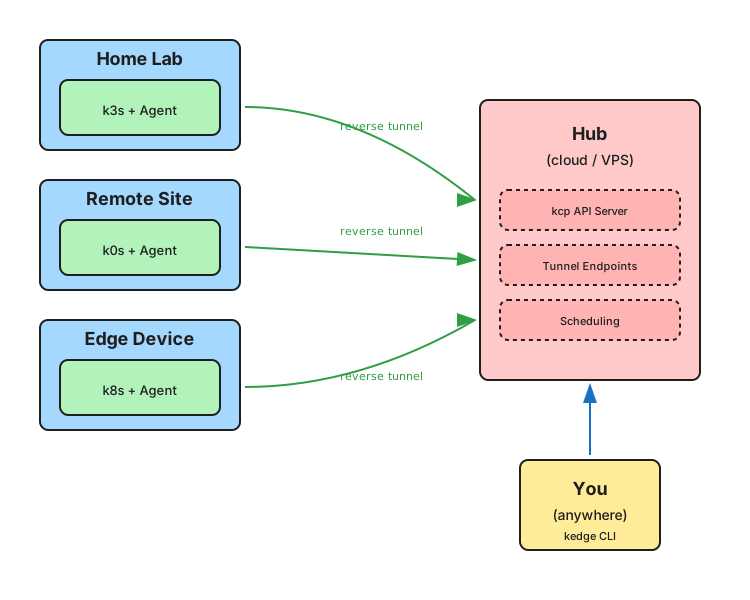
- Deploy a Hub — Run the Kedge hub on any reachable server (cloud VM, VPS, or your main home server)
- Connect Sites — Install the agent on each cluster; it establishes outbound tunnels to the hub
- Manage Everything — Use the CLI to deploy workloads, check status, and manage all clusters from one place
Key Features
| Feature | Description |
|---|---|
| Reverse tunnels | Agents connect outbound — no port forwarding, no VPN, no public IPs needed |
| Multi-tenant | Built on kcp for workspace isolation |
| Flexible auth | OIDC via Dex or simple static tokens for personal use |
| Placement rules | Deploy workloads to clusters matching labels (location, arch, resources) |
| Lightweight | Works with k3s, k0s, kind, or full Kubernetes |
| Simple networking | HTTP/1.1 + WebSockets — works with any proxy, load balancer, or tunnel |
Why HTTP/1.1?
Kedge intentionally uses HTTP/1.1 with WebSockets for all communication. While HTTP/2 or HTTP/3 offer some benefits, they create significant deployment complexity — especially for home labs and small setups.
With HTTP/1.1:
- Works everywhere — Compatible with nginx, Cloudflare, Caddy, HAProxy, and any reverse proxy
- Easy debugging — Standard tools like
curland browser DevTools work out of the box - No special configuration — No need for gRPC passthrough, HTTP/2 termination, or ALPN setup
- Tunnel-friendly — WebSockets work through Cloudflare Tunnel, ngrok, and similar services
This design choice prioritizes ease of deployment over marginal performance gains. For home labs managing a handful of clusters, simplicity wins.
Components
| Component | Description |
|---|---|
Hub (kedge-hub) |
Central control plane — hosts the API, authentication, tunnel endpoints, and scheduling |
Agent (kedge-agent) |
Runs on each site — establishes tunnels, reports status, reconciles workloads |
CLI (kedge) |
User tool — login, register sites, deploy workloads |
Resources
| Resource | Scope | Description |
|---|---|---|
Site |
Cluster | A connected Kubernetes cluster |
VirtualWorkload |
Namespace | Workload definition with placement rules |
Placement |
Namespace | Binding of a workload to a specific site |
Documentation
| Guide | Description |
|---|---|
| Getting Started | Set up your first hub and connect a site |
| Security | Authentication options — static tokens and OIDC |
| Ingress | Expose the hub publicly for remote access |
| Helm Deployment | Production deployment with Helm charts |
Quick Start
# Clone and build
git clone https://github.com/faroshq/kedge.git
cd kedge
make build

# Run the full dev stack locally
make dev

# In another terminal
make dev-login           # Authenticate
make dev-edge-create     # Register an edge
make dev-run-edge       # Start the edge agent
make dev-create-workload # Deploy a sample workload
See the Getting Started guide for the full walkthrough.