Ingress
Make your hub reachable from anywhere so remote agents can connect.
Overview
Remote agents need to reach your hub over the internet. This section covers different approaches to expose your hub publicly.
The Challenge
For Kedge to work with remote clusters, the hub must be reachable from:
- Agents — Running on remote clusters that establish reverse tunnels
- Users — Logging in via the CLI from anywhere
- Identity provider — OIDC callbacks during authentication
In a typical home lab setup, you face several challenges:
| Challenge | Description |
|---|---|
| No public IP | Most ISPs use CGNAT or dynamic IPs |
| Firewall/NAT | Routers block inbound connections |
| TLS certificates | Need valid certs for HTTPS |
| DNS | Need a stable hostname |
Ingress Options
Choose the approach that fits your setup:
| Option | Best For | Complexity | Public IP Required |
|---|---|---|---|
| Cloudflare Tunnel | Home labs, no public IP | Medium | No |
| Port Forwarding | Static IP, simple setup | Low | Yes |
| Tailscale/ZeroTier | Private mesh network | Low | No |
| Cloud Load Balancer | Cloud deployments | Low | Yes (provided) |
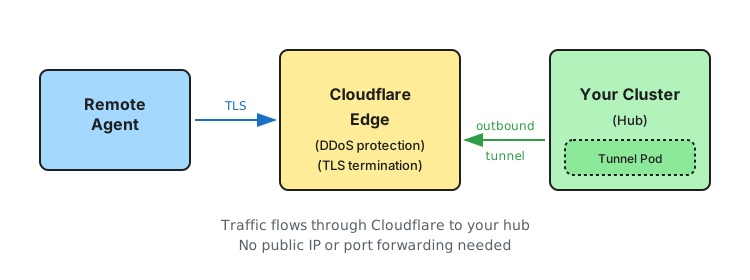
Recommended for home labs: Cloudflare Tunnel — works without a public IP, handles TLS, and provides DDoS protection.
Port Forwarding (Simple Setup)
If you have a static public IP and can forward ports on your router:
Prerequisites
- Static public IP (or Dynamic DNS)
- Router access for port forwarding
- No CGNAT from your ISP
Setup
- Forward port 443 to your cluster’s ingress controller or directly to the hub service
- Install an ingress controller (nginx, traefik, etc.)
- Point DNS to your public IP
- Configure TLS via cert-manager with HTTP01 challenge
# Example hub values with nginx ingress
hub:
  hubExternalURL: "https://hub.yourdomain.com"

  tls:
    certManager:
      enabled: true
      issuerRef:
        name: letsencrypt-prod
        kind: ClusterIssuer

ingress:
  enabled: true
  className: "nginx"
  hosts:
    - host: hub.yourdomain.com
      paths:
        - path: /
          pathType: Prefix
Tailscale / ZeroTier
For private access without public exposure, use a mesh VPN:
How It Works
- Install Tailscale/ZeroTier on the hub cluster node
- Install on machines that need to access the hub
- Use the mesh IP address as the hub URL
Pros & Cons
| Pros | Cons |
|---|---|
| No public exposure | Requires client installation on all machines |
| Simple setup | Agents must also be on the mesh |
| End-to-end encryption | Not suitable for truly “public” access |
This approach works well if all your agents and users are on the same Tailscale/ZeroTier network.
Cloud Load Balancer
When deploying to cloud providers (GKE, EKS, AKS), use their native load balancers:
hub:
  hubExternalURL: "https://hub.yourdomain.com"

service:
  type: LoadBalancer
  annotations:
    # GKE example
    cloud.google.com/load-balancer-type: "External"

ingress:
  enabled: false  # Using LoadBalancer service directly
The cloud provider assigns a public IP automatically. Point your DNS to this IP.
Next Steps
- Cloudflare Tunnel Setup — Detailed guide for the recommended home lab approach
- Security — Configure authentication after exposing the hub